Written by:
Stay updated with Roku Advertising.
If you're driving purchases, web conversions or app downloads, you’ve probably got search and social ads down to a science. But if you haven’t explored connected TV (CTV) advertising yet, now is the ideal time.
Consumers now spend 3.5 hours a day streaming—more than the 2.8 hours they spend on social media.¹ And with Roku Ads Manager, launching a CTV campaign to reach these audiences requires no more effort than running a social ad. In a few clicks, you can set up your campaigns, track performance with real-time insights, and even transform your existing video assets into CTV-ready ads.
Below we break down how Roku’s self-serve platform can put advanced targeting, automation, and performance-driving tools at your fingertips.
Reach Your Audiences When They’re Most Engaged
Instead of hoping your ad gets noticed while someone scrolls their feed, Roku Ads Manager places your brand front and center—right in the TV, movies and sports your audience loves.
And it does this while deploying advanced audience targeting and flexibility commonly associated with digital platforms.
1. Powerful segmentation:
Reach your audience based on demographics, interests, location, and even streaming or shopping habits. A New York-based fashion boutique can focus on local, frequent shoppers, while a petcare startup can zero in on viewers who are cat and dog owners.
[iframe src="https://player.vimeo.com/video/1027834593?h=97ee72fe53&badge=0&autopause=0&player_id=0&app_id=58479" width="100%" height="500"]
2. Custom Audiences:
No one knows your customers like you do. We’ve made it easy to build audiences using your first party data as a starting point. With custom audiences, you can retarget customers with new offers, exclude customers who have already converted and more.
Skip the learning curve by tapping into automation
You wear a lot of hats, and the last thing you need is a complicated ad platform. That’s why Roku Ads Manager is designed for ease and efficiency. With Roku Ads Manager, you can manage budgets, optimize, and run reports in just a few steps.
3. Drive the right KPIs:
Set your optimization goals—whether it’s video reach, website visits, conversions, or purchases —and let Roku’s custom-built CTV-specific algorithms fine-tune performance in real time.
[iframe src="https://player.vimeo.com/video/1027839878?h=4ee39b34a0&badge=0&autopause=0&player_id=0&app_id=58479" width="100%" height="500"]
4. Visualized reporting for instant insights:
Track campaign performance using our interactive dashboard. Identify which creatives are resonating, tweak targeting strategies, and get data-backed insights to scale what’s working.
[iframe src="https://player.vimeo.com/video/1027820000?h=2955f49103&badge=0&autopause=0&player_id=0&app_id=58479" width="100%" height="500"]
5. No CTV creative? No problem:
If you lack TV-quality video assets, Roku’s AI-powered video upscaling feature can turn your social and digital creatives into crisp, high-resolution CTV ads—without the sky-high production costs (spoiler: it’s free). For example, a handmade jewelry brand can take its YouTube ads and convert them into high-impact TV ads in minutes.
Also, check out our new program with Spaceback, our go-to partner to help you adapt your social content into CTV creative.
Stand out with Roku’s actionable ad formats
CTV isn’t just about reach. It’s about engagement that drives real action. Roku Ads Manager supports interactive ad formats that make it easy for viewers to connect with your brand directly from their remote.
6. Use Action Ads to engage directly with customers:
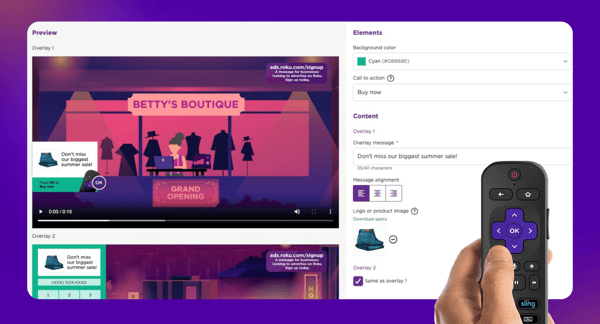
With a click of their Roku remote, viewers can request product info, claim a discount, or send a mobile coupon to their phone. Imagine a meal-prep service running an ad that lets users sign up for a free trial without ever leaving their couch. Or a food delivery service offering a discount on their next order. And best of all, no additional costs or minimums for you to get started!
[iframe src="https://player.vimeo.com/video/1027840748?h=6daf2207ca&badge=0&autopause=0&player_id=0&app_id=58479" width="100%" height="500"]
7. Shopify integration for direct purchases:
Have a Shopify store? Connect it directly to Roku Ads Manager so viewers can shop your products straight from their TV screen. For example, a trendy streetwear brand could feature limited-edition drops, letting customers add items to their cart and check out in seconds - all directly on screen!
[iframe src="https://player.vimeo.com/video/1027841186?h=c4bcdf06ea&badge=0&autopause=0&player_id=0&app_id=58479" width="100%" height="500"]
Ready to take your brand to the biggest screen in the house?
Sign up for Roku Ads Manager and start running your self-serve CTV campaign today.