Skip to content
Roku is ushering brands into the future of TV advertising. Learn how.

A tapestry of creative formats

Roku offers a various ad types, most of which fall into four categories: native, destination, video, and channel ads. Explore each category to discover the best creative package for your brand.

How do you want to show up?

Native Ads

Want to embed your brand within the Roku OS? These high-visibility ad types reach streamers on the largest screen in the home, and include placements within our iconic Roku City screensaver, wallpaper-like branded themes on our home screen, and more.

Marquee Ad
Marquee Ad Roku City Themes Spotlight Ad Tile
TV Frame
Native Ads - Marquee Ad on Roku Home Screen

Marquee Ad

Reach customers before they stream with our prominent home screen marquee ad, which can be static or animated. This unit acts as a powerful gateway to streaming services, destinations, content, and more.

Destinations

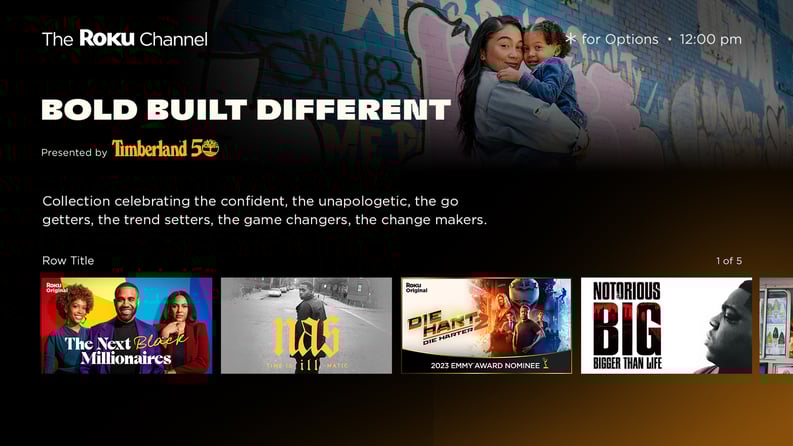
Support your audience’s entertainment experience in a way that cuts through the noise and clutter. Offer users a Movie Pass courtesy of your brand, or sponsor dedicated playlists around a theme or moment that matches your marketing goals, promoted from the Roku home screen.

Playlists
Playlists Passes Branded Entertainment
TV Frame
Roku Destination Ad Playlist example

Playlists

Generate fandom through Playlists that surface collections of content for your target audience. Customize for the tentpole moments or audiences that matter most.

Video Ads

Our in-stream ad experiences are akin to the classic broadcaster TV spot, but with a lighter ad load, and a wider variety of addressable audience targeting and segmentation.

Standard Video
Standard Video
TV Frame
Standard Video Ad example

Standard Video

Advertise within the Roku Channel and other AVOD apps within the Roku Publisher Media. Ensure audiences see your brand, with guaranteed 100% full-screen, unskippable ads, enjoying a high 95% average video completion rate.

Channel Ads (M&E only)

Promote your TV app in highly visible areas: to install when users are setting up their Roku, or highlighted as a featured app within the Roku Streaming Store as users browse for more channels.

Initial Channel Set-up
Initial Channel Set-up Featured Tile
TV Frame
Channel Ads on Roku

Initial Channel Set-up

Introduce your channel to new users setting up their Roku in the first possible touchpoint. Your channel app can be part of the suggested downloads during the Roku set-up process for each user’s device.

Ready to get started?

Let's chat