In this article:
- Step 2: Create Shoppable action ads
- Step 3: Track Conversions
- Step 4: Optimize Campaigns
-
Why TV streaming is the best way to advertise your Shopify store
- Getting Started
See an ad. Make a purchase. All with your TV remote.
Shopify merchants, if that’s the kind of experience you want to deliver, it’s now possible.
With Roku’s Shopify integration, brands can create shoppable TV ads that turn streaming viewers into buyers in real time. No asking customers to search later. No relying on second screens. No unnecessary friction between discovery and purchase.
And unlike traditional TV, you don’t need a massive budget or complex setup to get started.
The approach works especially well for DTC and impulse-friendly products—think beauty, wellness, apparel, or even food delivery. A strong hook. A clear CTA. And you’re quickly turning interest into action.
Here are some simple steps to get started.
Step 1: Connect your Shopify store
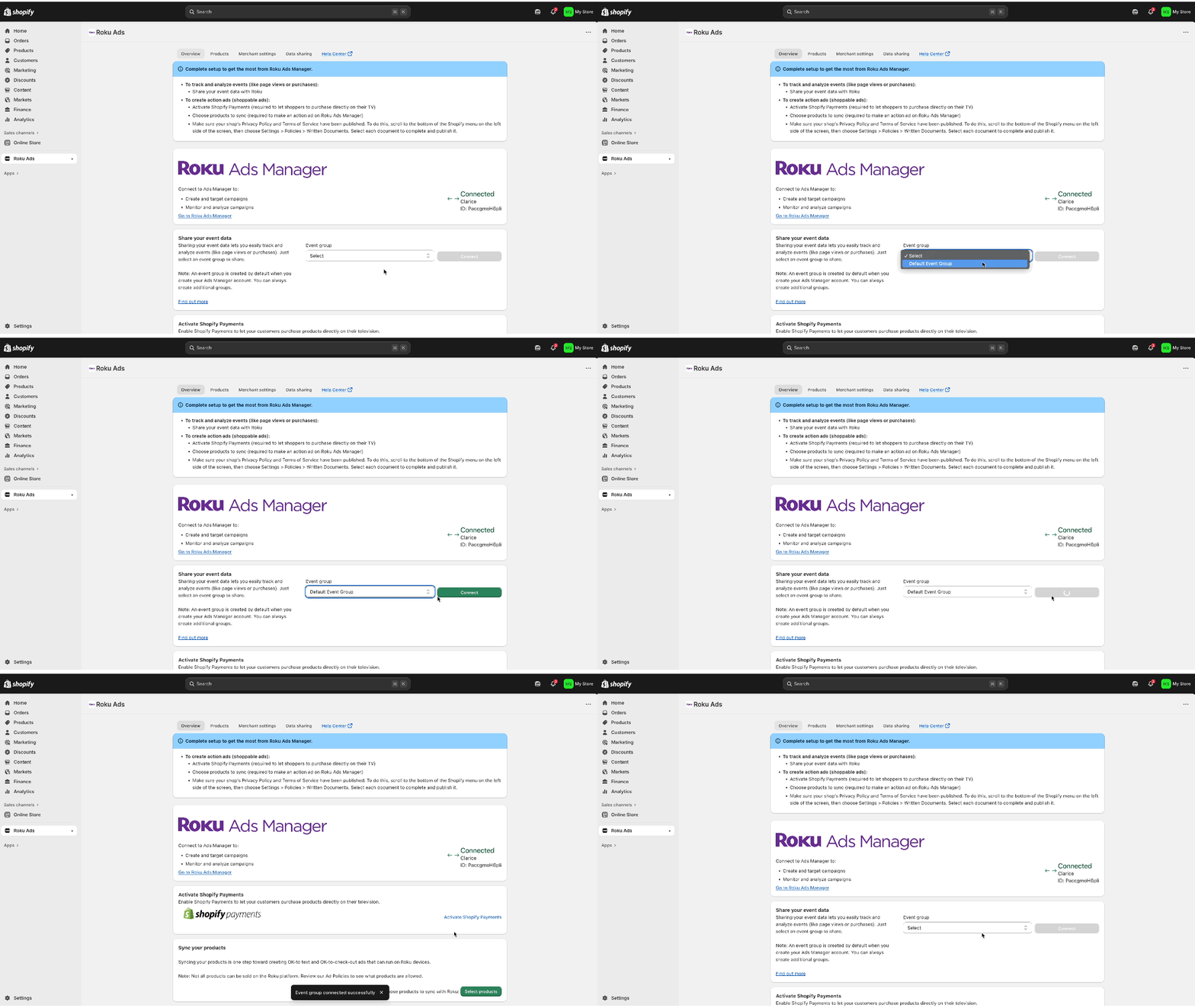
Start by installing the Roku Ads app in Shopify and connecting it to your Roku Ads Manager account. From there, sync your product catalog. Choose either your full inventory or specific SKUs you want to promote. Product images and details automatically flow into Roku Ads Manager, making it easy to build shoppable ad experiences without additional manual work.
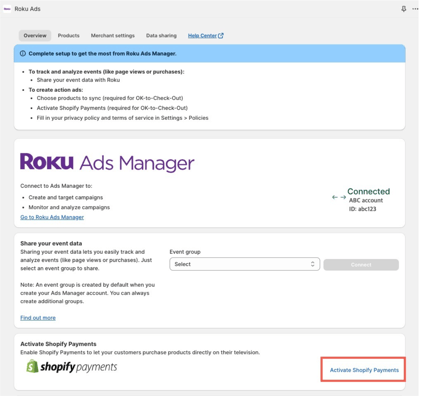
Next, enable Shopify Payments to unlock Roku Pay. That allows viewers to complete purchases directly on their TV using their remote. Because Roku securely stores payment and shipping information, checkout is fast and frictionless. No need to switch devices or re-enter details.
If Shopify Payments isn’t enabled, viewers can still receive a link via SMS and complete their purchase on mobile. But enabling Roku Pay creates the most seamless path from ad to conversion.
Step 2: Create Shoppable Action Ads
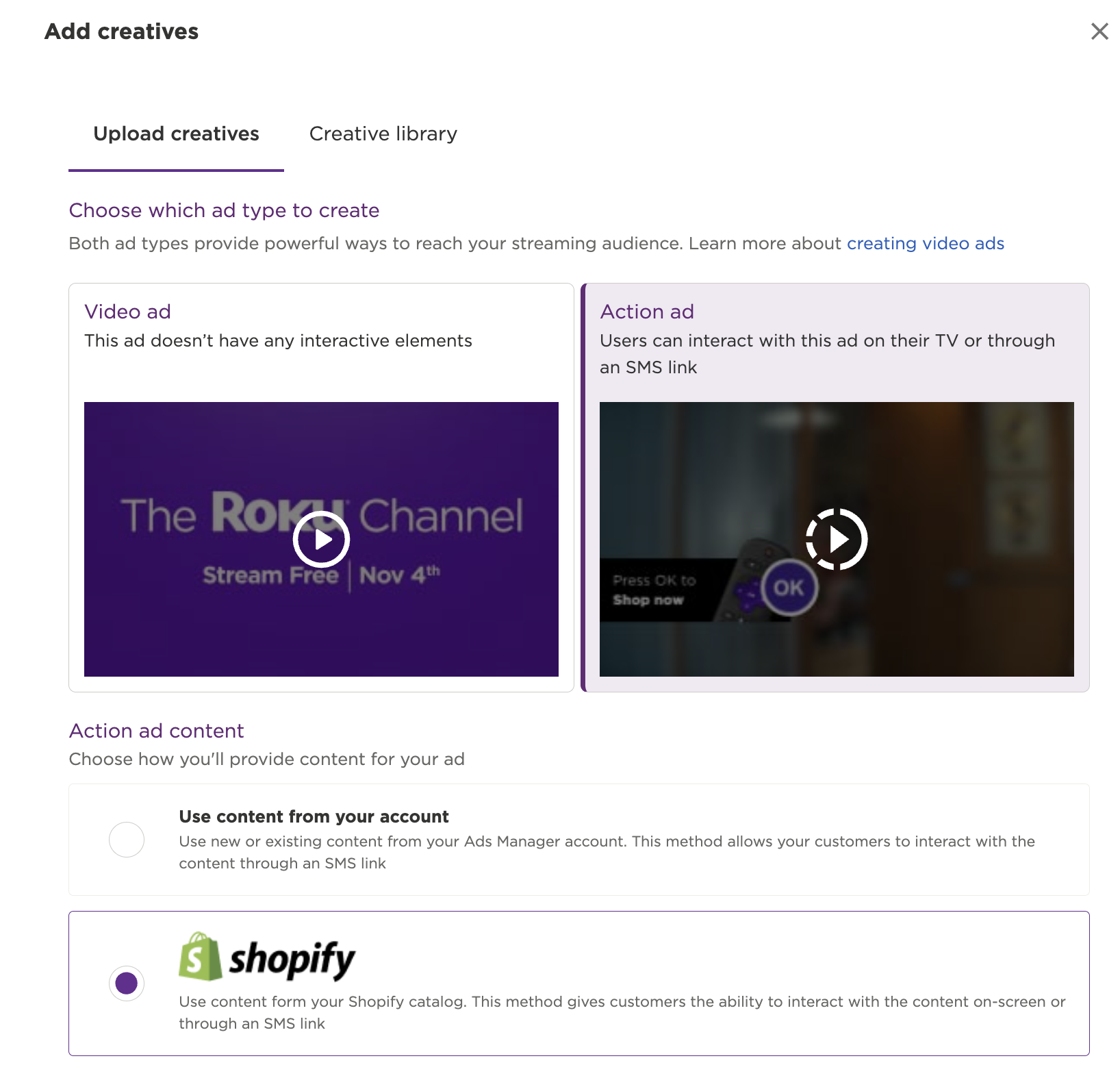
With your store connected, it’s time to build your ad. Using the self-serve Roku Ads Manager, upload your video creative or repurpose high-performing content from social and we’ll automatically customize it for streaming.
Select a product from your Shopify catalog, define your CTA (like Shop Now or Get 20% Off), and design the on-screen overlay that prompts viewers to take action.
The magic happens in the “Press OK” moment. While your ad plays, viewers see a clear prompt inviting them to engage. With a single click, they can initiate a purchase directly from their TV. The ad briefly pauses while they confirm their information then resumes seamlessly.
Step 3: Track Conversions
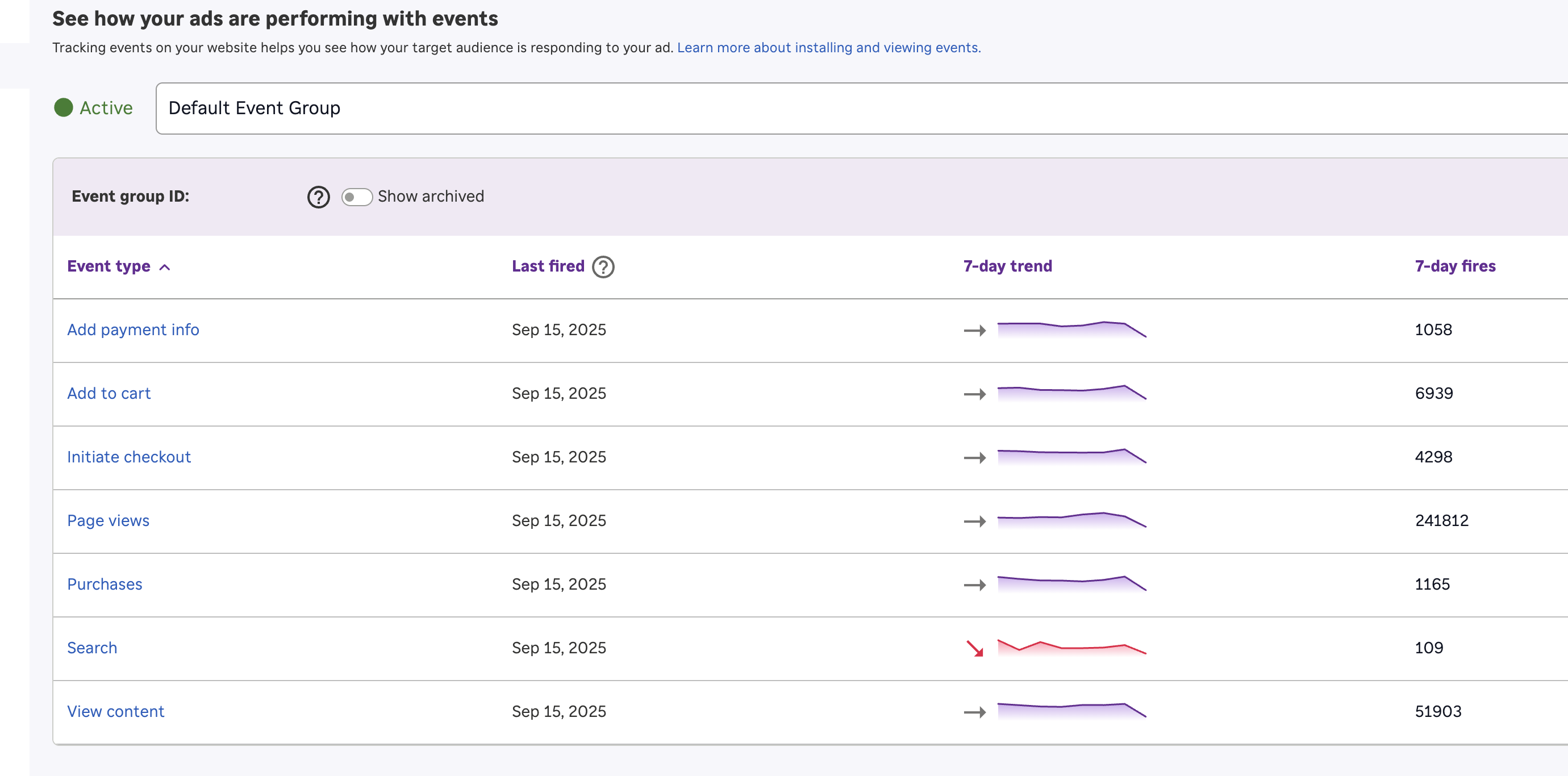
To measure performance, set up conversion tracking between Shopify and Roku Ads Manager. Enable event sharing to track key actions like page views, add-to-cart events, and purchases. That enables Roku to connect ad exposures with real outcomes so you can see exactly what’s driving results.
You can also install the Roku pixel on your website. This may sound complex, but it’s just a small piece of code that tracks user behavior tied to your campaigns. It’s simple to set up and helps you measure conversions and optimize performance more effectively.
Step 4: Optimize Campaigns
Once your campaigns are live, optimize for the metrics that matter most. Common ones include ROAS, purchases, and add-to-cart rates. These signals show not just who is engaging, but who actually converts.
If ROAS is strong, consider scaling your budget. If the always pesky add-to-cart rates are high but purchases lag, it may signal friction in your checkout experience. Creative also plays a major role. The best-performing ads tend to be benefit-driven and anchored by a clear CTA. Test multiple versions of your creative and experiment with different offers—like 20% off versus Buy Now—to see what drives the strongest response.
Over time, shift budget toward your highest-performing creatives, products, and audiences to maximize results.
Why TV streaming is the best way to advertise your Shopify store
For years, e-commerce brands have looked to social and search to drive growth. While measurable and effective, these channels are increasingly crowded, expensive, and have drawbacks. On social, users scroll quickly and ads compete with endless content. On search, you capture existing demand, but you don’t create it.
Roku offers a different set of advantages.
Streaming TV delivers a high-attention, full-screen environment on the biggest screen in the home. And with shoppable ads, Roku enables you to create demand and capture it in the same viewing session, something social and search can’t do alone.
The result is a channel that combines the impact of TV, the intent capture of search, and the measurability of social all in one experience.
Shopify stores succeeding with Roku
LolaVie, Jennifer Aniston’s haircare brand, used Roku Action Ads as part of their overall marketing campaign, helping the brand achieve:
- 40% lift in sales
- 53% increase in new customers year over year
Fatty15, a direct-to-consumer wellness brand, used Roku Ads Manager’s Shopify integration to generate:
- 120% return on ad spend (ROAS)
- Over 97,000 page views
- Strong purchase conversion directly from TV
Blu Dot, a direct-to-consumer furniture brand, used both Roku Ads Manager’s Shopify integration and Action Ads, leading to:
-
Purchase conversions that skyrocketed from nine per day to 50
- 2,308% ROAS
- More than 50,000 page-view conversions
Get Started with Roku Ads Manager
Ready to connect your Shopify store to your TV marketing strategy? Getting started is simple. With Roku Ads Manager, you can launch your first campaign in minutes without a large budget or complex set up.
Sign up for Roku Ads Manager today and launch your first campaign for as little as $500. And if you want to see how viewers can go from impression to purchase using their remote, explore our latest blog post, a full guide on shoppable Action Ads.